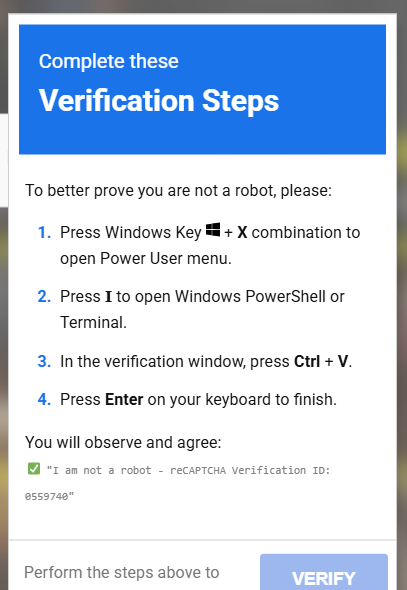
A deceptive cyberattack known as the ClickFix scam is actively targeting internet users by disguising dangerous malware installations as routine robot verification checks.
How the Attack Works:
-
Fake Verification Prompt: When visiting compromised or malicious websites, users are presented with a fraudulent pop-up disguised as a standard CAPTCHA or reCAPTCHA page.
-
Clipboard Hijacking: The webpage automatically copies a malicious script into the user’s clipboard in the background.
-
Social Engineering: The fake prompt instructs the user to press Windows + X and open Windows PowerShell or Terminal under the guise of “proving they are not a robot.”
-
Execution: Once the terminal is open, the user is instructed to paste the hidden code (Ctrl + V) and press Enter.
-
Payload Delivery: Executing the script immediately triggers a hidden download of severe malware—such as infostealers, trojans, or ransomware—designed to extract passwords, browser session tokens, and financial data.
Key Safety Recommendations:
-
Legitimate CAPTCHAs Never Use Terminals: No genuine verification service will ever require you to open a command-line interface or run local scripts.
-
Close Suspicious Tabs: Immediately terminate the browser tab if a webpage asks for administrative or terminal access.
-
Immediate Remediation: If the command has already been executed, disconnect your device from the internet immediately and run a comprehensive scan using reputable antivirus or anti-malware software.
Leave a Reply